

How does a tournament work and where can I find Resultate, Stats and Specials?
Updated August 23, 2026
Games are played at the paired boards; you manage the tournament itself via the Resultate, Stats, Specials and Rangliste tabs. The eye icon opens the Live view, and the gear icon opens the settings during the tournament.
The four tabs

- Group selection — switch between groups.
- Next pairing — the match coming up next.
- Table — G games, W wins, L losses, P points, B Legs.
- Header — Teilen, Live view (eye) and settings (gear).
Playing at the board
The player interface runs on the paired tablet.

- Current pairing — including a field for the scorer.
- Eingabemodus — Numerisch records the total per turn, Pro Dart records each dart individually.
- Start — begins the match.
- Board number — to confirm you're at the right device.
Under DANACH you can see which match follows at this board.

The Offene Spiele tab shows all pairings not yet played. This allows a free board to pull forward a match.
After each match

- Nächstes Spiel bereit — the pairing that can continue straight away.
- Auto-Continue — after the displayed countdown it continues automatically. Tapping stops this.
- OK — confirms the result immediately.
The notice Gespeichert — Bracket aktualisiert confirms that the result has been recorded in the tournament tree.
From the group stage to the knockout phase

Once all group matches have been played, the K.O.-Phase can be started — at any board or on the tournament creator's phone. Both lead to the same result; whoever taps first starts it.
Last chance to change the mode. Until the K.O.-Phase starts, you can still change its mode via the gear icon in the tournament settings — after that it is fixed. Anyone wanting to switch from Best of 5 to Best of 7 must do so beforehand.

- Phase selection — switch between group stage and K.O.-Phase.
- Liste / Bracket — two views of the same round.
- BYE — a bye. The player advances without playing a match.

Stats and Specials

The table is sorted by Avg; the triangle indicates the direction. Swiping right reveals ø9D, ø12D and further columns.

- Nach Special / Nach Spieler — the same data from two perspectives.
- Special card — the threshold is shown below the heading, here ≥ 141 points. Alle anzeigen expands the full list.

Tap a player to see their individual performances.
Live view
The eye icon in the header opens the view for spectators.

- Dashboard / Live — overview or ongoing matches.
- Board card — score, match and Leg average, best score and darts thrown per player.
- Star — highlights a board so it stays at the top.

- Key figures — status, tournament average, best average, 180er and High-Finish.
- Boards — the current state at each board.
Excluding a player after the fact
The gear icon also gives you access to the player list during the tournament. What options are available depends on how far the tournament has progressed.
Still in the group stage
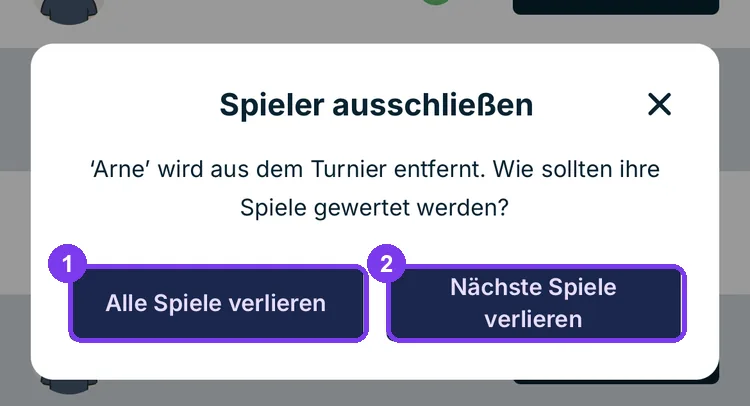
- Alle Spiele verlieren — even already played group matches are set to a loss for the player. This shifts the standings.
- Nächste Spiele verlieren — completed matches remain unchanged; only the remaining open matches are forfeited.
Once the K.O.-Phase is running

Now only Nächste Spiele verlieren is available. Group matches can no longer be annulled — they have already determined the seedings.
In the Resultate, such an exclusion later appears as Walkover with the note W.O. ADMIN.
End of tournament

At the end, Dartcom displays the podium with each player's average. The same view appears on the board and is closed there with Fertig.